
If you’re interested in Kubernetes like I am, you’ve probably found yourself exploring related projects on GitHub and you might have stumbled upon a repository called Agones. If you’ve never heard about it, Agones is a project created by Google to manage and deploy video game servers on Kubernetes.
Recently, I dipped my toes in the water and tried it out. I had a lot of fun doing so and I want to share everything I learned. In this article, we will go over the following:
- The creation of a basic game server in Go.
- Integrating it with Agones’ SDK.
- Its deployment on Kubernetes with Agones.
- The making of a matchmaking service in Go.
- Setting up and benchmarking autoscaling for our infrastructure based on the matchmaking’s player queue.
I’ll share a lot of relevant code snippets and diagrams, but if you want to get the full picture, you can find the source code and the Kubernetes manifests in this GitHub repository:
Why Agones#
Before going any further, we need to address a question regarding Agones: Why does it even exist? That was my first reaction upon discovering Agones because, in theory, anyone can just deploy their game server as a regular deployment on a cluster, right? Well, things are actually a bit more complicated than that.
If you look into the Agones documentation, you will find this section which basically answers the question. To put it simply, game server workloads are both stateful and stateless. An empty game server is stateless and can be safely deleted or moved, while a game server with players probably has in-memory state and must not leave the node.
In other words, Agones allows you to manage and scale game server workloads based not only on CPU, memory, or traffic but also on player activity. Thanks to that, you can update game servers without shutting down servers with active players, reuse a game server on which a game has ended or even set autoscaling based on the number of full game servers. And much more.
Developing a game server in Go#
If you don’t care about the dev part or if you already have a game server you want to deploy, you can skip to this part: ↓ Adding Agones to a game server
To start, we obviously need a game to work with. For this purpose, I will be making a quick and simple game of rock paper scissors in Go.
Since this is just a simple demo, I won’t be trying to make something grandiose. It will just be a basic HTTP server with a WebSocket on which two players will connect to battle. For a real game, you would probably want to use UDP connections.
Both players will be connected to the WebSocket and will have to select their move. The connection stays open for both players until they both selected a move. Once both players chose their moves, the server sends the winner to them.
To do this, I used standard Go packages such as net/http and github.com/gorilla/websocket.
 1package main
 2
 3//go:embed index.html
 4var index embed.FS
 5
 6var game *Game
 7
 8func main() {
 9	// Inititalize the game
10	game = NewGame()
11
12	http.HandleFunc("/", func(w http.ResponseWriter, r *http.Request) {
13		http.FileServer(http.FS(index)).ServeHTTP(w, r)
14	})
15	http.HandleFunc("/ws", game.ws)
16	log.Println("Starting HTTP server on port 3000")
17	log.Fatal(http.ListenAndServe(":3000", nil))
18}
The root path (/) serves the index.html file (which is embedded in the binary) and the /ws path serves the WebSocket connection.
When making a game server, you should avoid using ports 8080, 9357 and 9358 in your container image as these will be used by the Agones sidecar container.
The index.html is just a very basic web page with buttons for each move (rock, paper, scissors). It uses JavaScript to send a message to the WebSocket when a button is clicked. Results are displayed in the result div.
 1<div>
 2    <h1>Rock Paper Scissors</h1>
 3
 4    <button onclick="send('rock')">🪨</button>
 5    <button onclick="send('paper')">📄</button>
 6    <button onclick="send('scissors')">✂️</button>
 7
 8    <div id="result"></div>
 9</div>
10
11<script>
12    const ws = new WebSocket("ws://" + location.host + "/ws");
13
14    ws.onmessage = (e) => {
15        document.getElementById("result").innerHTML = e.data;
16    };
17
18    function send(choice) {
19        ws.send(choice);
20    }
21
22    window.addEventListener("beforeunload", () => {
23        ws.close();
24    });
25</script>
I won’t go too much into details about the game logic since, well, it’s just a simple game of rock paper scissors.
The game loop is fully coded in the WebSocket handler, and it uses methods from the game package located in ./internal/game. Here’s a basic overview of what this handler does:
 1func (s *Server) ws(w http.ResponseWriter, r *http.Request) {
 2	conn, _ := upgrader.Upgrade(w, r, nil)
 3	defer conn.Close() // Ensure connection is always closed when the handler exits.
 4
 5	// Create a new player based on the connection
 6	player := game.NewPlayer(conn)
 7	s.game.AddPlayer(player)
 8
 9	// Read the first message which should contain the player's move
10	msgType, msg, err := conn.ReadMessage()
11	if err != nil {
12		// Client disconnected or error occurred
13		s.game.RemovePlayer(player)
14		return
15	}
16
17	// Play the current player's move
18	s.game.PlayMove(player, string(msg))
19
20	// Check if the two players have played
21	if s.game.Ended() {
22		s.game.SendResults()
23		return
24	}
25
26	// First player gets into a loop waiting for the opponent's move
27	player.Send("Waiting for opponent...\n")
28	for {
29		_, _, err := conn.ReadMessage()
30		if err != nil {
31			// Client disconnected or error occurred
32			s.game.RemovePlayer(player)
33			return
34		}
35	}
36}
If you try to make something similar, keep in mind that you have to handle what happens when a player disconnects or leaves the game. In this case, I just made it so the player gets deleted from the game allowing them or someone else to rejoin. You may want to just end the game or kick everyone else if one of the players disappears.
In order to manage concurrency, I use a simple mutex to ensure that the player list and moves are not modified at the same time. Before every operation, I lock the mutex and unlock it after the operation is complete. For example:
 1type Game struct {
 2	players []*Player
 3	mu      sync.Mutex
 4}
 5
 6...
 7
 8func (g *Game) AddPlayer(player *Player) {
 9	if len(g.players) >= 2 || player == nil {
10		return
11	}
12
13	g.mu.Lock()
14	defer g.mu.Unlock()
15	g.players = append(g.players, player)
16	log.Printf("Player %p added to game", player)
17}
Upon game end, the WebSocket connections are closed and the game server shuts down.
The end result looks like this:

Very impressive, isn’t it? Jokes aside, this simple multiplayer game will be more than enough for us to get started with Agones.
For this quick demo, I made a game server which is running only a single game instance to keep things simple. In our case, it would make more sense to have “rooms” and be able to host multiple game instances in a single container. You can find out more about this in High Density GameServers | Agones.
Adding Agones to a game server#
Now that we have a game server ready, we need to make some tweaks in order to deploy it with Agones. If you try to deploy it as of right now, it will just crash as Agones expects your container to send regular ping.
To explain briefly how things work in Agones, when deploying a game server, we use the well named GameServer resource. You can think of GameServers as the equivalent of Pods in the Agones world. They are what will be running your game server container.
The main difference with regular Pods is that GameServers run your image alongside an Agones SDK sidecar which is responsible for managing the lifecycle of the game server. This sidecar is responsible for ensuring that the game server is healthy and available for players. It communicates with the Kubernetes API to update the GameServer resource status.
---
title: GameServer Architecture
config:
  look: handDrawn
---
graph TD
    KubeAPI["kube-apiserver"]

    subgraph GameServer["GameServer"]
        subgraph Pod["Pod"]
            GameContainer["**Your Game Server**
*Container*"]
            AgonesSidecar["**agones-sdk**
*Container*"]

            GameContainer <-->|SDK gRPC| AgonesSidecar
        end
    end

    AgonesSidecar -->|HTTP PATCH GameServer resource| KubeAPI
The bare minimum to get your game server up and running with Agones is to implement a Health Check. To do this, we first need to import the Agones Game Server Client SDK. In my case, I will be importing the Go package but there are also SDKs for other languages such as Java or C++ and also for game engines such as Unity or Unreal Engine.
Even if your language or game engine doesn’t have an SDK, you can still use Agones by making and deploying a sidecar container alongside your game server. This sidecar container would be responsible for communicating with Agones and you would just need to communicate with your game binary. Or else, you can just communicate directly with Agones using the gRPC API or the HTTP API which should be supported by most languages.
Once we have our SDK installed, we need to actually implement the health check. This is usually done by creating a loop that sends a ping to Agones every few seconds. Here’s how you can do it in Go:
 1func main() {
 2	...
 3	go HealthPing(sdk, ctx)
 4}
 5
 6func HealthPing(sdk *sdk.SDK, ctx context.Context) {
 7	tick := time.Tick(2 * time.Second)
 8	for {
 9		err := sdk.Health()
10		if err != nil {
11			log.Fatalf("Could not send health ping, %v", err)
12		}
13		select {
14		case <-ctx.Done():
15			log.Print("Stopped health pings")
16			return
17		case <-tick:
18		}
19	}
20}
Now, we can technically already deploy our game server on a Kubernetes cluster with Agones by creating a GameServer with our game container image. However, we are far from production-ready. We still need to at least implement the following Agones functions:
- Ready() - To indicate that the game server is ready to accept connections from players.
- Shutdown() - To tell Agones to shut down the game server.
Implementing the Ready() function is pretty straightforward. We just need to call it from the SDK when starting the game server:
 1func main() {
 2	...
 3	// Mark server ready
 4	if err := sdk.Ready(); err != nil {
 5	    log.Fatalf("Failed to mark Ready: %v", err)
 6	}
 7
 8	go HealthPing(sdk, ctx)
 9
10	log.Fatal(http.ListenAndServe(":3000", nil))
11}In theory, you would want your Ready() call to be after your HTTP listener or whatever you’re using is fully up and running. In this case, it doesn’t really matter as http.ListenAndServe is pretty much instantaneous.
If you’re used to building apps for Kubernetes, you might have thought about implementing a readiness and a liveness probes. However, here, we don’t need those because Agones will manage the game server lifecycle for us.
For the Shutdown() function, things are a bit more complicated. What we want to do is to implement a graceful shutdown process. Basically, it means that we need our server to handle signals like SIGTERM politely by waiting for everything to complete before shutting down. It is especially important in order to avoid loss of player data or of an unsaved game for instance.
Fortunately, this pattern is pretty easy to implement in Go. We will be using the context package to handle cancellation and timeouts coupled with the signal package to handle, as its name implies, signals.
We are first going to need to create a context that will be used all throughout our server. In order to have it be cancellable with Unix signals, we will be creating it using signal.NotifyContext from the os/signal package. We can then, at the end of our main() function, have all of our code for shutting down our server after <-ctx.Done().
 1func main() {
 2	// Set up signal handling for graceful shutdown
 3	ctx, cancel := signal.NotifyContext(context.Background(), syscall.SIGTERM, syscall.SIGINT)
 4	defer cancel()
 5
 6	...
 7
 8	// Initialize HTTP server
 9	httpServer := s.newHTTPServer()
10	go func() {
11		log.Println("Starting HTTP server on port 3000")
12		if err := httpServer.ListenAndServe(); err != nil && err != http.ErrServerClosed {
13			log.Fatalf("Failed to start HTTP server: %v", err)
14		}
15	}()
16
17	// Wait for shutdown signal
18	<-ctx.Done()
19
20	// Shutting down everything
21	log.Println("Shutting down...")
22	s.sdk.Shutdown()
23	s.game.Shutdown()
24	httpServer.Shutdown(ctx)
25}
Currently, we handle shutdown from signals correctly, but not necessarily gracefully. In general, when implementing this pattern, we want to ensure that all ongoing operations are completed before shutting down. In our case, this isn’t really important as the process of shutting down the client SDK and the HTTP server should be pretty straightforward.
However, let’s say you’re making an actual game: you may want to save the result of your game to a database, for example. In Kubernetes, Pods getting deleted are first sent a SIGTERM, and have a grace period of 30 seconds. After that, Kubernetes sends a SIGKILL, which you want to avoid if possible. If for some reason the database you’re sending your data to is experiencing issues, you will want to rollback your transaction before being forcefully terminated.
We can achieve this by having a timeout, and to do that, we’re going to make, once again, a new context, but with context.WithTimeout() this time around. This way, we will be able to pass down the context with timeout to our different shutdown functions and ensure that our game server is properly shut down in a given amount of time.
In my case, I set it up with a timeout of 10 seconds. This is more than enough for the Agones client SDK and the HTTP server to shut down gracefully.
 1func main() {
 2	...
 3
 4	// Wait for shutdown signal
 5	<-ctx.Done()
 6
 7	// Create a context with a timeout for graceful shutdown
 8	shutdownCtx, cancel := context.WithTimeout(context.Background(), 10*time.Second)
 9	defer cancel()
10
11	// Shutting down everything
12	log.Println("Shutting down...")
13	s.sdk.Shutdown()
14	s.game.Shutdown()
15	httpServer.Shutdown(shutdownCtx)
16}What we just implemented is basically the 9th factor of the Twelve-Factor App methodology called “Disposability”. If you don’t know about this methodology, I highly recommend you to read it and implement it in your projects.
With all of this, we now have the lifecycle of our game server fully implemented and ready to be deployed alongside Agones’ SDK sidecars in actual GameServer resources.
Deploying a game server#
Now that we have our game server ready, we can deploy it on a Kubernetes cluster. I’m using a basic kind cluster for this example, but you can use any Kubernetes cluster you want. The only important requirement is to install Agones on your cluster. To do so, you can simply use Helm chart like so:
helm repo add agones https://agones.dev/chart/stable
helm repo update
helm install my-release --namespace agones-system --create-namespace agones/agones
We will be deploying our game server in the default namespace. If you want to deploy yours in a different one, you may need to change some values in your Helm deployment of Agones.
Once we have our cluster ready with Agones up and running, we can start by deploying our game server image in a simple GameServer resource:
 1apiVersion: agones.dev/v1
 2kind: GameServer
 3metadata:
 4  name: rps-game
 5spec:
 6  template:
 7    ports:
 8      - name: default
 9        containerPort: 3000
10        protocol: TCP
11    spec:
12      containers:
13      - name: rps-game
14        image: ghcr.io/noetarbouriech/agones-rps-game/game
You should then be able to see it by running kubectl get gameservers. You should see something like this:
NAME       STATE       ADDRESS        PORT   NODE                           AGE
rps-game   Ready       192.168.97.2   7278   agones-cluster-control-plane   10s
Notice how Agones picked a random port between 7000 and 8000 for the game server. This port is exposed on the host node’s network using the hostPort field of Pods. This means that you can access the game server directly from your host machine using the IP address and port number.
You can even check its events to see the different steps it went through:
kubectl events --for='GameServer/rps-game'Which should give you something like this:
LAST SEEN   TYPE     REASON         OBJECT                            MESSAGE
3m58s       Normal   Creating       GameServer/rps-game   Pod rps-game created
3m52s       Normal   Scheduled      GameServer/rps-game   Address and port populated
3m52s       Normal   RequestReady   GameServer/rps-game   SDK state change
3m52s       Normal   Ready          GameServer/rps-game   SDK.Ready() complete
You should be able to access the game directly from your web browser by visiting http://ADDRESS:PORT.
You can use the following to get the host IP and port:
kubectl get gs -o jsonpath='{.items[0].status.address}:{.items[0].status.ports[0].port}'Next, we can deploy the game server in a Fleet. If GameServers are the equivalent of Pods, you can think of Fleets as the equivalent of Deployments or StatefulSets. They allow us to have replicas of our GameServer and scale them up and down without killing active game servers. We can create one just like so:
 1apiVersion: agones.dev/v1
 2kind: Fleet
 3metadata:
 4  name: rps-game
 5spec:
 6  replicas: 3
 7  template:
 8    spec:
 9      ports:
10        - name: default
11          containerPort: 3000
12          protocol: TCP
13      template:
14        metadata:
15          labels:
16            app: rps-game
17        spec:
18          containers:
19            - name: rps-game
20              image: ghcr.io/noetarbouriech/agones-rps-game/game
We can then check the GameServers it created:
kubectl get gameserversNAME STATE ADDRESS PORT NODE AGE
rps-game-4sxlg-bl6bh Ready 192.168.97.2 7447 agones-cluster-control-plane 4s
rps-game-4sxlg-kfmbn Ready 192.168.97.2 7384 agones-cluster-control-plane 4s
rps-game-4sxlg-kld5r Ready 192.168.97.2 7165 agones-cluster-control-plane 4sThis fleet can easily be scaled up by running kubectl scale:
kubectl scale fleet rps-game --replicas=5But, right now, if you try to scale it down, it could kill active GameServers. What we want to do in order to avoid that is to use a GameServerAllocation. This type of resource allows us to set its state from Ready to Allocated, which will prevent Agones from deleting that GameServer. Let’s allocate a random GameServer from our fleet with kubectl:
kubectl create -f - <<EOF
apiVersion: allocation.agones.dev/v1
kind: GameServerAllocation
spec:
  selectors:
    - matchLabels:
        agones.dev/fleet: rps-game
EOF
Now, let’s do something a bit extreme and scale the fleet down to 0 replicas:
kubectl scale fleet rps-game --replicas=0If you look at the list of GameServers, you’ll notice that the one we allocated is still there:
NAME                   STATE       ADDRESS        PORT   NODE                           AGE
rps-game-4sxlg-bl6bh   Allocated   192.168.97.2   7447   agones-cluster-control-plane   9m40s
This is great, as we managed to scale down without stopping a GameServer that has been marked as being allocated for a game. If you go ahead and finish playing a game on this server, you’ll notice that the GameServer gets automatically deleted.
Of course, in real life, you would probably use the Kubernetes API to allocate our GameServers instead of using kubectl. This way, we can automate the allocation process without manual intervention.
You might also want to check out the Allocator Service as an alternative way to allocate GameServers from outside our Agones Kubernetes cluster.
Making a matchmaking service#
So far, we managed to make a game server, hook it up to Agones and deploy it on a Kubernetes cluster. All of this is great but it’s nothing we couldn’t have achieved by simply using regular Kubernetes resources such as Deployments or StatefulSets. But now that we have everything set up, we can actually go a bit further and exploit Agones’ features to have a matchmaking service which will scale our game servers automatically based on demand 🚀.
Or, at least, that’s what we’re going to do in the next part of this post. For now, we’ll focus on making a matchmaking service that will match 2 players together and will allocate a GameServer to them.
If you look online, you might find an open-source solution for matchmaking called Open Match. It has been made by Google, and it can work with Agones, which is great. However, as of writing this, there hasn’t been any update in over 2 years. A second version of Open Match called Open Match 2 seems to be planned but there are no releases yet and only a single person seems to be working on it.
Just to be clear, I’m not saying you should avoid using Open Match, but given the current state of the project, and that it would be overkill for our needs, we’ll be making our own simple matchmaking service instead.
Here’s what we’ll be working with:
---
config:
  look: handDrawn
---
sequenceDiagram
    participant Player as 👤 Player
    participant WebSocketServer as 🌐 HTTP Server
    participant Topic_matchmaking as 📇 Topic: matchmaking
    participant Matcher as ⚙️ Matcher
    participant Topic_match_results as 📇 Topic: match_results_{playerID}
    participant KubernetesAPI as ☸️ Kubernetes API

    Player->>WebSocketServer: Connect via WebSocket
    WebSocketServer->>WebSocketServer: Generate playerID
    WebSocketServer->>Topic_match_results: Subscribe
    WebSocketServer->>Topic_matchmaking: Publish playerID

    Topic_matchmaking->>Matcher: Deliver playerID

    alt No one waiting
        Matcher->>Matcher: Store playerID as waiting
        Note right of Matcher: Wait for next player
    else Another player waiting
        Matcher->>KubernetesAPI: Allocate GameServer
        KubernetesAPI-->>Matcher: GameServer address
        Matcher->>Topic_match_results: Publish match for both players
        Topic_match_results->>WebSocketServer: Deliver match result
        WebSocketServer->>Player: Redirect to match-ip:port
    end
For simplicity’s sake, I copied the base structure of the game server and reused it in the matchmaking service. This is why we are once again working with an HTTP server serving a WebSocket on /ws. This time, we redirect the player by opening the web page the matchmaking service will return.
The core component of this matchmaking system is the Pub/Sub queue. As you can see on the diagram, we are working with two topics:
- matchmaking: Player requests for a match.
- match_results_{playerID}: Topics for the response to the player.
The brain of the operation is named the Matcher, and is basically a process that will take a player from the queue and match them with another one. Once a match is made, it will reserve a GameServer by creating a GameServerAllocation through the Kubernetes API. It then sends them both the server address they need to join via the match results topic of both player.
To work with Pub/Sub in Go, we’ll be using a great library called Watermill, which will simplify the task a lot. What’s great about this library is that it works with a lot of different options, including Kafka, RabbitMQ or even PostgreSQL. To keep things simple, I chose to go with a simple Go Channel which you can also use as a Pub/Sub with Watermill.
Here’s how the WebSocket handler initiates the matchmaking process and waits for a match result with Watermill:
 1func (s *Server) ws(w http.ResponseWriter, r *http.Request) {
 2	conn, _ := upgrader.Upgrade(w, r, nil)
 3	defer conn.Close() // Ensure connection is always closed when the handler exits.
 4
 5	playerID := rand.Text() // random player ID
 6	playerResultTopic := fmt.Sprintf("match_results_%s", playerID)
 7
 8	// Publish the matchmaking request
 9	msg := message.NewMessage(watermill.NewUUID(), []byte(playerID))
10	if err := s.pub.Publish("matchmaking", msg); err != nil {
11		log.Printf("Failed to publish matchmaking message: %v", err)
12		return
13	}
14
15	// Subscribe to the player's result topic
16	messages, err := s.sub.Subscribe(s.ctx, playerResultTopic)
17	if err != nil {
18		log.Printf("Failed to subscribe to player result topic: %v", err)
19		return
20	}
21
22	// Wait for a match result
23	select {
24	case <-s.ctx.Done():
25		return // Exit if the server is shutting down
26	case msg := <-messages:
27		matchResult := string(msg.Payload)
28		log.Printf("Match found for player %s: %s", playerID, matchResult)
29
30		// Send the match result back to the WebSocket client
31		if err := conn.WriteMessage(websocket.TextMessage, []byte(matchResult)); err != nil {
32			log.Printf("Failed to send match result: %v", err)
33			return
34		}
35
36		// Acknowledge the message and exit
37		msg.Ack()
38		return
39	}
40}
As you can see, it’s pretty straightforward with functions such as Subscribe() and Publish().
That’s basically it for the “frontend” part of the matchmaking service, but there’s a second part which is called the matcher. It runs as a goroutine but it could be run as a separate service if we were to use another Pub/Sub. It’s responsible for matching two players from the matchmaking queue.
To do that, I used a Router from Watermill, which gives a lot of features that are pretty nice to build event-driven systems. In our case, I’m just using it to add a handler for the matchmaking topic, which can be done just like this:
router, _ := message.NewRouter(message.RouterConfig{}, logger)
router.AddConsumerHandler(
	"matchmaking_handler", // Name of the handler
	"matchmaking",         // Topic to subscribe to
	m.sub,                 // Subscriber
	m.matchmakingHandler,  // Handler function,
)
Handler functions in Watermill work like you would expect, by taking a message as input to process it.
 1func (m *Matcher) matchmakingHandler(msg *message.Message) error {
 2	// Process the matchmaking message
 3	playerID := string(msg.Payload)
 4	log.Printf("Processing player: %s", playerID)
 5
 6	m.mu.Lock()
 7	defer m.mu.Unlock()
 8
 9	if m.waiting == "" {
10		m.waiting = Player(playerID)
11		return nil
12	}
13
14	var matchResult string
15	var err error
16	retryInterval := 5 * time.Second
17
18	for {
19		matchResult, err = AllocateGameServer()
20		if err == nil {
21			break
22		}
23		log.Printf("Failed to allocate game server: %v", err)
24		time.Sleep(retryInterval)
25	}
26
27	resultMsg := message.NewMessage(watermill.NewUUID(), []byte(matchResult))
28
29	// Publish the match result to the player's topic
30	playerResultTopic := fmt.Sprintf("match_results_%s", playerID)
31	if err := m.pub.Publish(playerResultTopic, resultMsg); err != nil {
32		log.Printf("Failed to publish match result: %v", err)
33		return err
34	}
35
36	// Publish the match result to the waiting player's topic
37	waitingResultTopic := fmt.Sprintf("match_results_%s", m.waiting)
38	if err := m.pub.Publish(waitingResultTopic, resultMsg); err != nil {
39		log.Printf("Failed to publish match result: %v", err)
40		return err
41	}
42
43	// remove waiting player
44	m.waiting = ""
45
46	// no error
47	return nil
48}
What’s really important are the parts that are highlighted. You should be able to see the basic matchmaking logic which is to set a player as waiting if no other player is waiting. And when a second player joins, match them together and publish the result to both players.
Notice also how this time I don’t use any msg.Ack(). It’s because the function is automatically called by Watermill if the handler doesn’t return an error.
Last but not least, we have to take a look at the AllocateGameServer() function which allocates a random GameServer and returns its IP and port. To do that, I simply use the Kubernetes API to create a resource like we made earlier.
allocation := &v1.GameServerAllocation{
	ObjectMeta: metav1.ObjectMeta{
		GenerateName: "game-alloc-",
		Namespace:    "default",
	},
	Spec: v1.GameServerAllocationSpec{
		Selectors: []v1.GameServerSelector{{
			LabelSelector: metav1.LabelSelector{
				MatchLabels: map[string]string{
					"agones.dev/fleet": "rps-game",
				},
			},
		}},
	},
}
However, if you try deploying the matchmaking service just like that with a Deployment, it will actually not do anything. This is because by default, we are using the default ServiceAccount to access the Kubernetes API from our Pod. To fix this, we just need to create a new ServiceAccount and a RoleBinding that grants the necessary permission to create GameServerAllocation resources.
1apiVersion: v1
2kind: ServiceAccount
3metadata:
4  name: matchmaking-sa
5 namespace: default1apiVersion: rbac.authorization.k8s.io/v1
2kind: Role
3metadata:
4 name: gameserverallocator
5 namespace: default
6rules:
7 - apiGroups: ["allocation.agones.dev"]
8 resources: ["gameserverallocations"]
9 verbs: ["create"] 1apiVersion: rbac.authorization.k8s.io/v1
2kind: RoleBinding
3metadata:
4 name: gameserverallocator-binding
5 namespace: default
6subjects:
7 - kind: ServiceAccount
8 name: matchmaking-sa
9 namespace: default
10roleRef:
11 kind: Role
12 name: gameserverallocator
13 apiGroup: rbac.authorization.k8s.ioAnd then, we can use this newly created ServiceAccount in our Deployment:
 1apiVersion: apps/v1
 2kind: Deployment
 3metadata:
 4  name: matchmaking
 5spec:
 6  replicas: 1
 7  selector:
 8    matchLabels:
 9      app: matchmaking
10  template:
11    metadata:
12      labels:
13        app: matchmaking
14    spec:
15      serviceAccountName: matchmaking-sa
16      containers:
17        - name: matchmaking
18          image: ghcr.io/noetarbouriech/agones-rps-game/matchmaking
19          ports:
20            - containerPort: 3000
Now, we can just create a Service for this Deployment and access it using port-forwarding like that:
kubectl port-forward service/matchmaking 3000:80If we access the matchmaking service at localhost:3000 and try to play a game, we get this:
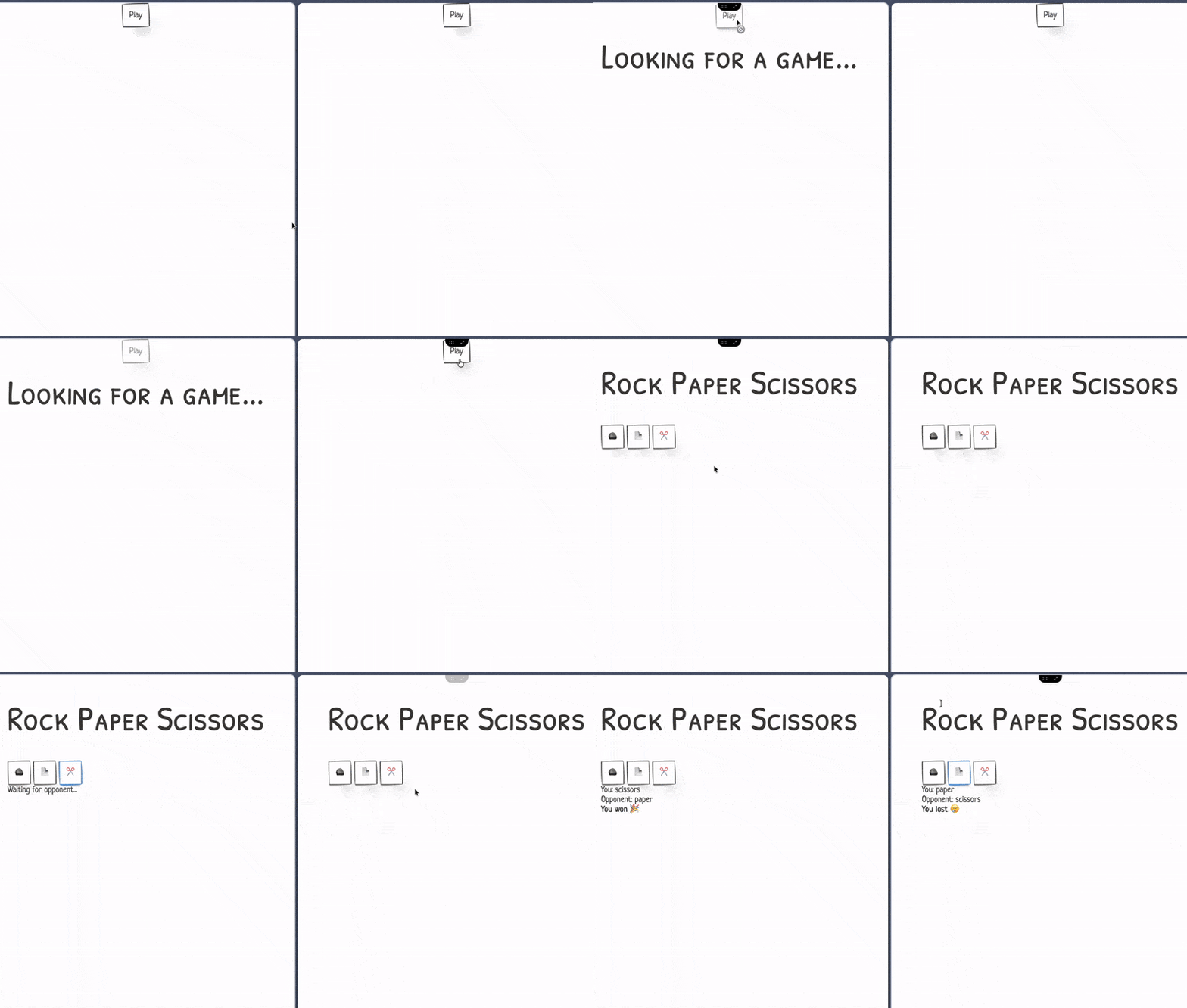
As you can see from the screen briefly flashing to black, the matchmaking service indeed redirects to a game server once a match is found.
Something to keep in mind is that in its current state, the matchmaking is not scalable. You can’t really run multiple instances of the matchmaking as you could end up with players stuck in different matcher’s instances.
However, it shouldn’t really matter as you can shard the matchmaking service by region (eu, us, etc.) or skill-level (Elo, rank). Then, you can have an instance of the matchmaking service for each shard. For example, you could have an instance running only on eu.elo100-200.matchmaking and one on us.elo100-200.matchmaking.
Also, I used a WebSocket again because I shamelessly copy-pasted the code from the game server as the base for the matchmaking service. However, you would be better off using an HTTP API where you issue a ticket and poll the match result. Or, maybe even SSE?
Setting up autoscaling of game servers#
Everything works pretty well so far, right? Well, there’s still a problem that remains to be solved. If you’ve followed along until now, so far we have a game running on Agones. There are multiple instances and a matchmaking service that routes each player to one of them. However, if we have 6 players all playing at the same time, we’ll end up with our 3 games instances being allocated, making it impossible for the matchmaking service to find a game for any new players.
To solve this issue, we have to set up autoscaling for our fleet of game servers. To do that, we need to create a FleetAutoscaler:
 1apiVersion: "autoscaling.agones.dev/v1"
 2kind: FleetAutoscaler
 3metadata:
 4  name: rps-game-autoscaler
 5spec:
 6  fleetName: rps-game
 7  policy:
 8    # type of the policy
 9    type: Buffer
10    buffer:
11      # Size of a buffer of "ready" game server instances
12      bufferSize: 10
13      maxReplicas: 100
14  sync:
15    type: FixedInterval
16    fixedInterval:
17      # the time in seconds between each auto scaling
18      seconds: 5
I set it up with a buffer policy which ensures that there’s always a buffer of ready game servers available. In this case, I set it to 10 instances which are checked every 5 seconds.
There are other policies which are also interesting to look at such as:
- The counter policy which scales based on a GameServer counter. It can be useful if you set up multiple rooms in a single game instance like I mentioned earlier.
- The webhook policy which allows us to scale based on a custom logic we can implement as a webhook handler. We can, for instance, scale it based on the number of players waiting in the matchmaking system.
- The WASM policy which as its name implies, allows us to scale based on a custom logic using WebAssembly modules. I have yet to find a use case for it, but it’s definitely interesting to explore.
- The Schedule policy which is pretty neat as it allows us to set a policy for a specific time period. It can be useful to scale up during an event or for the release of a game, for example.
For simplicity’s sake, we’ll continue with the buffer policy as it works decently well if we set the sync interval to a low value.
Now, for the fun part, let’s put this autoscaling to the test!
There’s a tool called k6 which is a load testing tool made by Grafana that can be used to simulate a large number of users connecting to our game server. We can use it to test our autoscaling policy and see how it performs under load. It simulates users with a custom script that can be written in JavaScript.
Here’s the one I made for this project:
 1import ws from "k6/ws";
 2import http from "k6/http";
 3import { check } from "k6";
 4
 5export const options = {
 6  vus: parseInt(__ENV.K6_VUS) || 100,
 7  duration: __ENV.K6_DURATION || "20s",
 8};
 9
10export default function () {
11  const wsURL = "ws://localhost:3000/ws";
12
13  const params = { tags: { test: "websocket-match" } };
14
15  const res = ws.connect(wsURL, params, function (socket) {
16    socket.on("open", function open() {
17      console.log("Connected to matchmaking");
18    });
19
20    socket.on("message", function message(data) {
21      const matchURL = data.toString().trim();
22      console.log(`Received match URL: ${matchURL}`);
23
24      // Make HTTP GET request to the match URL
25      const httpRes = http.get(matchURL);
26
27      // Check if the HTTP request was successful
28      check(httpRes, {
29        "match URL status is 200": (r) => r.status === 200,
30      });
31
32      console.log(`HTTP Response status: ${httpRes.status}`);
33
34      socket.close();
35    });
36
37    socket.on("close", function close() {
38      console.log("WebSocket disconnected");
39    });
40
41    socket.on("error", function error(err) {
42      console.log("WebSocket error:", err);
43    });
44  });
45
46  // Check WebSocket connection status
47  check(res, {
48    "websocket status is 101": (r) => r && r.status === 101,
49  });
50}
As you can see, this script that is definitely not AI-generated opens the WebSocket connection with the matchmaking service and just sends a GET request to the game server.
We’ll be running this script in k6 with 100 virtual users for a duration of 30 seconds.
And here’s the result:
k6 output logs
  █ TOTAL RESULTS

    checks_total.......: 220     4.398727/s
    checks_succeeded...: 100.00% 220 out of 220
    checks_failed......: 0.00%   0 out of 220

    ✓ match URL status is 200
    ✓ websocket status is 101

    HTTP
    http_req_duration..............: avg=1.44ms  min=354.87µs med=1.31ms  max=5.49ms  p(90)=2.14ms  p(95)=2.54ms
      { expected_response:true }...: avg=1.44ms  min=354.87µs med=1.31ms  max=5.49ms  p(90)=2.14ms  p(95)=2.54ms
    http_req_failed................: 0.00%  0 out of 110
    http_reqs......................: 110    2.199363/s

    EXECUTION
    iteration_duration.............: avg=23.13s  min=106.02ms med=24.19s  max=46.16s  p(90)=45.77s  p(95)=46.14s
    iterations.....................: 110    2.199363/s
    vus............................: 40     min=40       max=100
    vus_max........................: 100    min=100      max=100

    NETWORK
    data_received..................: 170 kB 3.4 kB/s
    data_sent......................: 37 kB  739 B/s

    WEBSOCKET
    ws_connecting..................: avg=26.93ms min=3.49ms   med=35.46ms max=44.52ms p(90)=41.99ms p(95)=42.34ms
    ws_msgs_received...............: 110    2.199363/s
    ws_session_duration............: avg=23.13s  min=105.98ms med=24.19s  max=46.16s  p(90)=45.77s  p(95)=46.14s
    ws_sessions....................: 150    2.999132/s


running (50.0s), 000/100 VUs, 110 complete and 40 interrupted iterations
default ✓ [ 100% ] 100 VUs  20s
As you can see, the autoscaler has a hard time keeping up with the load. To avoid that, we can increase the buffer size and decrease the sync interval. Or even better, switch to the webhook policy and implement a webhook endpoint which exposes the number of players currently waiting for a game server allocation.
The next step would be to improve the script to include actual game inputs with the game servers. With this, we could even imagine running a kind cluster with Agones and our game and k6 as part of CI tests.
Conclusion#
This little experiment with Agones took longer than I first expected it to be, but I learned a lot and had quite some fun. Overall, I would say that Agones is very interesting in the way it transforms how we work with Kubernetes.
I think making a game and a matchmaking system from scratch to work with Agones really helped me understand better how concepts would work together. I understood so much more about Agones doing it this way than I did at first when going through the documentation.
Still, there are many things I haven’t tried, such as the other autoscaling policies, using counters and lists, or just working with an actual game server with real-time communication in UDP. There are also related projects such as Quilkin which is a UDP proxy that can be used to route traffic to game servers and seems to work well with Agones.
I hope this article has been helpful for you and that you have learned something new about Agones and Kubernetes. I would appreciate any feedback you might have on this article. Thank you for reading!